Before you run a sample, it helps to know roughly what the spectrum should look like. After you run it, it helps to have something to compare it with. The NMR Spectrum Simulator does both jobs: you draw a structure, and it predicts the ¹H and ¹³C spectra together with COSY, HSQC and HMBC maps, all labeled atom by atom.
This guide goes through one complete example, ethyl acetate, from drawing the molecule to reading every part of the result.
Drawing the molecule
Open Simulators, NMR, Spectrum Simulator. Most of the page is taken up by a structure editor.
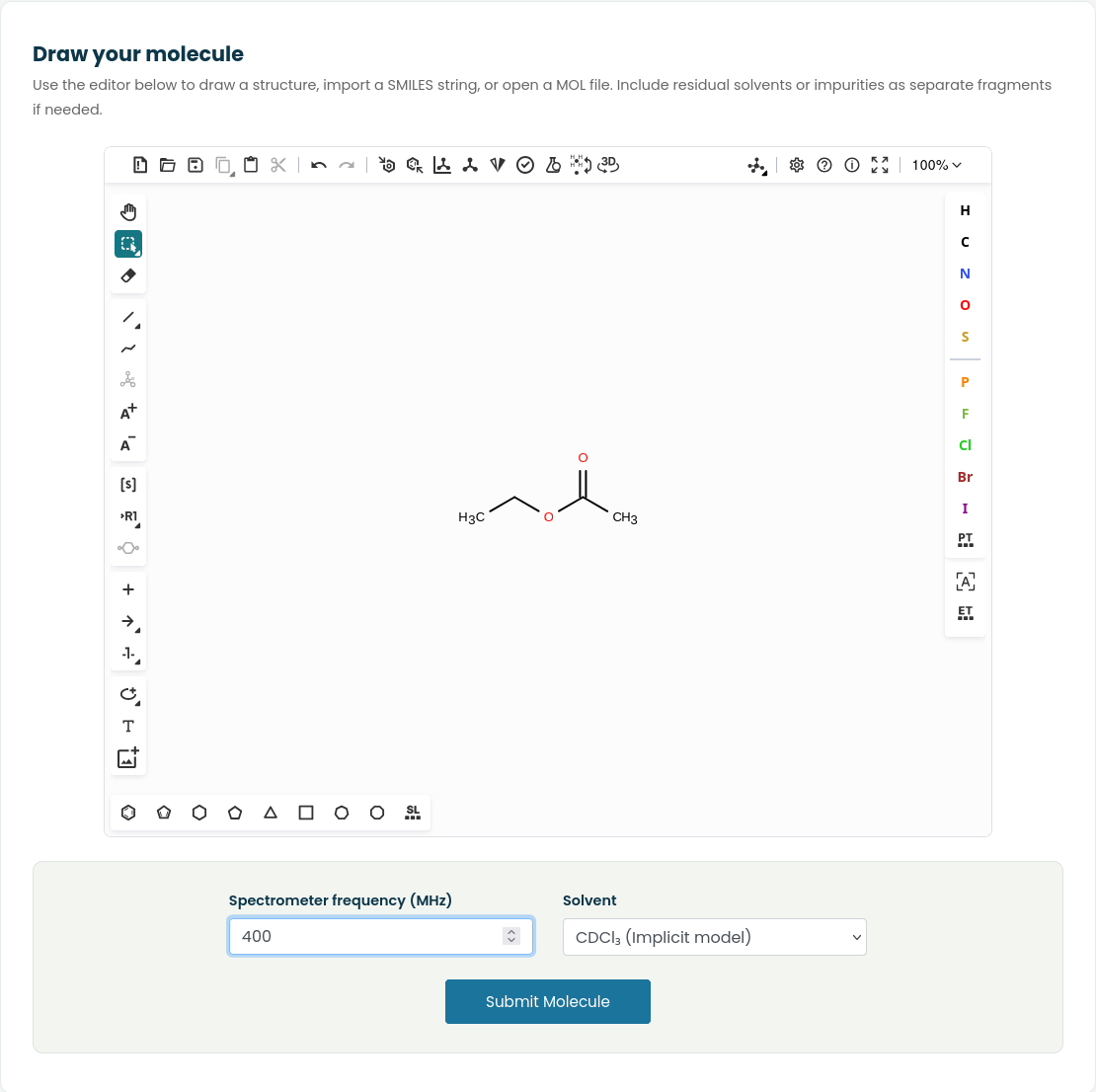
There are three ways to get a structure into it:
- Draw it with the bond and atom tools.
- Paste a SMILES string. For ethyl acetate that is
CCOC(C)=O. - Open a MOL file from your computer with the folder icon.
If your real sample contains a residual solvent or a known impurity, you can draw it as a separate fragment next to your compound. Its signals will then appear in the predicted spectrum as well, which makes the comparison with your measured spectrum more realistic.
Below the editor there are two settings:
- Spectrometer frequency (MHz). Use the frequency of the instrument you will compare with. Coupling constants are fixed in Hz, so at a higher field the multiplets take up less room on the ppm scale. Setting this to match your instrument makes the predicted multiplets look like the ones you will measure.
- Solvent. Choose between no solvent (gas phase), CDCl₃ and CD₃CN. The solvents are included through an implicit solvation model.
For this example we used 400 MHz and CDCl₃. Press Submit Molecule and a short progress page appears while the calculation runs. For a small molecule it takes a few seconds, a little longer for larger ones.
The numbered structure
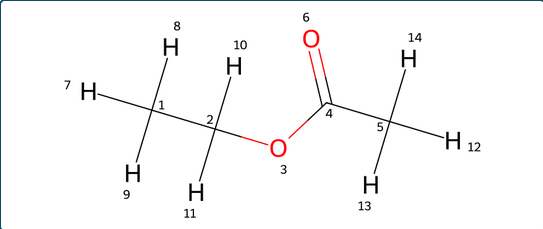
The result page starts with your molecule drawn with every atom numbered, hydrogens included. Keep this picture in view, because every label in the spectra and tables below refers to these numbers. In ethyl acetate, C1 is the methyl carbon of the ethyl group, C2 the OCH₂, C4 the carbonyl carbon and C5 the acetyl methyl. H7 to H9 sit on C1, H10 and H11 on C2, and H12 to H14 on C5.
The ¹H spectrum
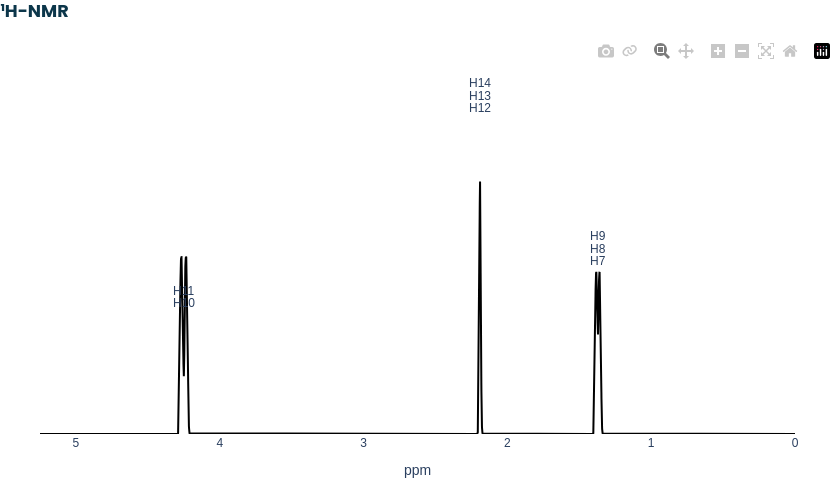
Each peak is labeled with the hydrogens that produce it, so you can read the integral by counting the labels. Ethyl acetate gives three signals:
- 4.25 ppm, H10 and H11: the two OCH₂ protons.
- 2.19 ppm, H12 to H14: the acetyl methyl.
- 1.37 ppm, H7 to H9: the methyl of the ethyl group.
The signals of the ethyl group are split by the coupling between the CH₂ and CH₃ protons, while the acetyl methyl has no neighbors to couple with and appears as a single sharp line. The plots are interactive, so you can drag over a region to zoom in on a multiplet, hover to read exact positions, and save the image with the camera icon.
The ¹³C spectrum
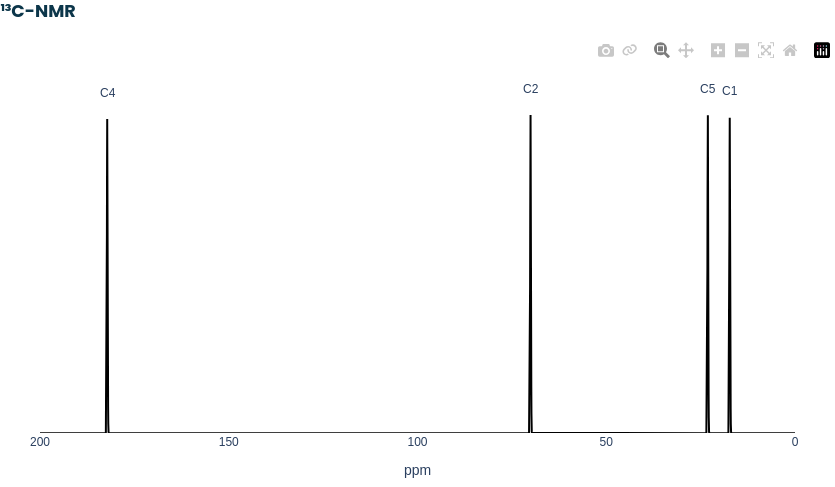
The ¹³C spectrum is shown proton decoupled, with one line per carbon environment, each labeled with its atom number. For ethyl acetate there are four: the carbonyl carbon C4 at the far left at 182.2 ppm, the OCH₂ carbon C2 at 70.1 ppm, and the two methyl carbons C5 and C1 at 23.1 and 17.3 ppm.
The shift and coupling tables
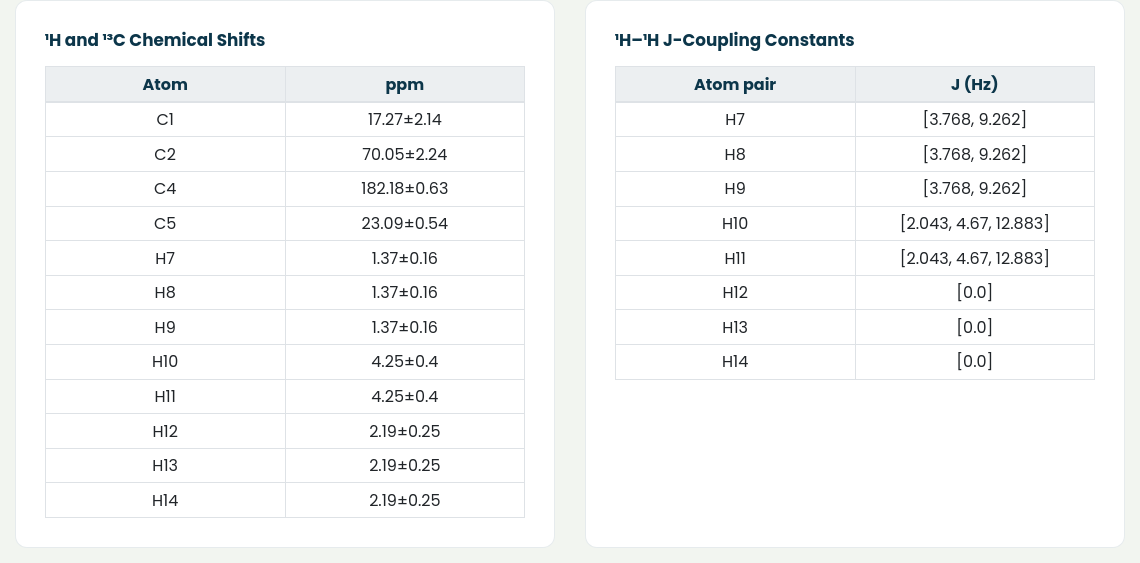
Below the spectra are two tables. The first lists the predicted chemical shift of every carbon and hydrogen. Each value comes with a ± figure, which is an uncertainty estimate. It reflects how much the shift varies among the reference environments in our database that match that atom. A narrow range means the environment is well defined. A wide one means you should give that prediction less weight when you compare it with your data. In this example the acetyl methyl hydrogens (2.19 ± 0.25 ppm) are better defined than the OCH₂ hydrogens (4.25 ± 0.40 ppm).
The second table lists the coupling constants predicted for each hydrogen, in Hz. These are the values used to draw the splitting in the ¹H spectrum. A value of 0.0, as for H12 to H14, means the proton has no coupling partners, which is why the acetyl methyl shows up as a single line.
COSY
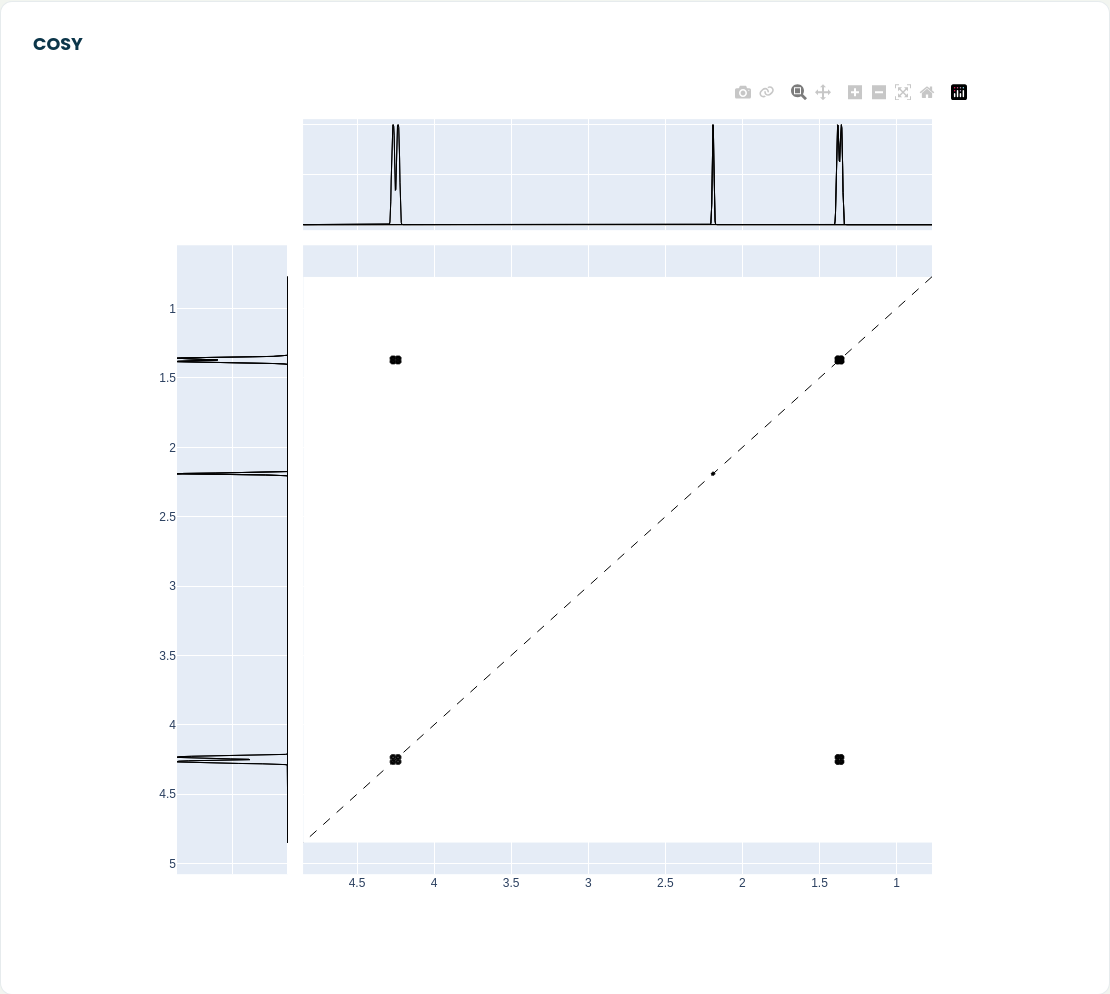
The COSY map shows which protons are coupled to each other. Every signal appears on the diagonal. The interesting part is the off-diagonal cross peaks, which connect two coupled signals. Here there is one pair of cross peaks, linking 1.37 ppm and 4.25 ppm: the CH₃ and CH₂ of the ethyl group. The acetyl signal at 2.19 ppm sits on the diagonal with no cross peaks, which tells you it is an isolated spin system.
HSQC
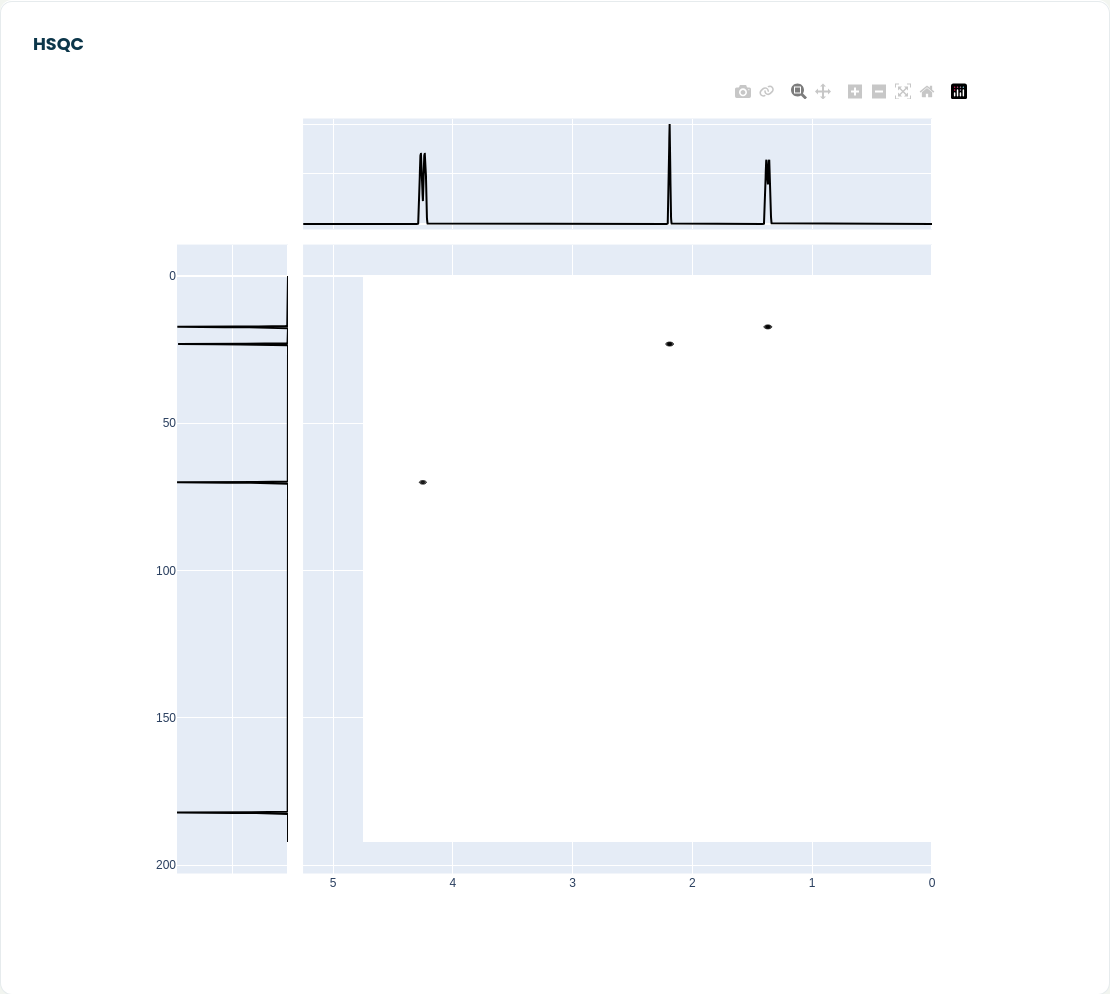
HSQC links each proton to the carbon it is directly attached to. The proton spectrum runs along the top and the carbon spectrum down the side. Ethyl acetate gives three spots: 4.25 ppm with C2, 2.19 ppm with C5, and 1.37 ppm with C1. The carbonyl carbon C4 has no hydrogens, so it does not appear in the HSQC at all. Any carbon that is present in the ¹³C spectrum but missing from the HSQC carries no hydrogens, like a carbonyl or a substituted aromatic carbon.
HMBC
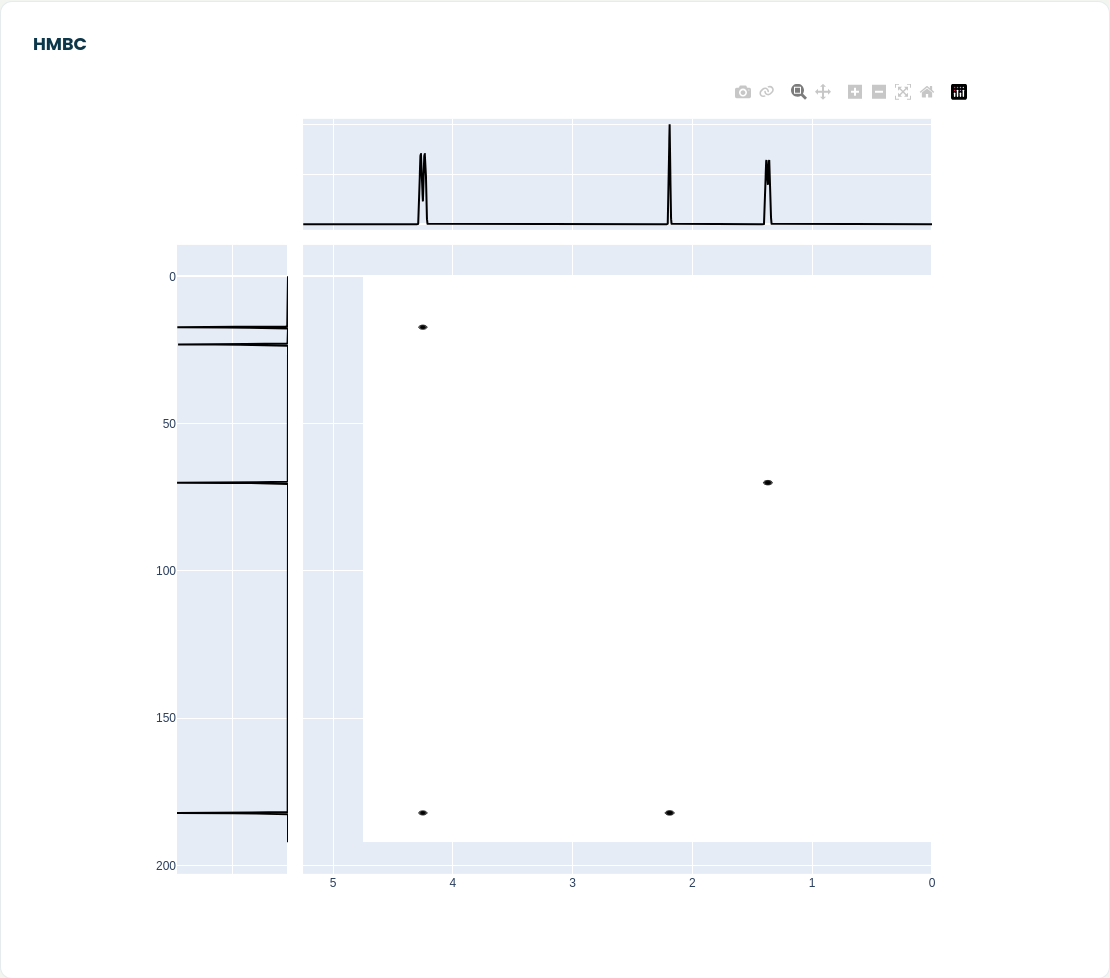
HMBC shows correlations between protons and carbons two or three bonds away, and it is the map that ties the fragments of a molecule together. In this example there are four spots:
- The OCH₂ protons at 4.25 ppm correlate with C1 (two bonds) and with the carbonyl carbon C4 (three bonds, through the ester oxygen).
- The acetyl protons at 2.19 ppm correlate with C4 (two bonds).
- The ethyl CH₃ protons at 1.37 ppm correlate with C2 (two bonds).
The correlation between the OCH₂ protons and the carbonyl carbon is the important one. Neither COSY nor HSQC can connect the ethyl group to the acetyl group, because there is no proton on the oxygen or the carbonyl carbon to carry the information across. HMBC can, and it is how you would prove that this is an ethyl ester rather than two separate fragments.
How to use the predictions
A few ways the simulator fits into everyday work:
- Checking a proposed structure. Simulate your candidate and compare it with your measured spectrum, signal by signal, keeping the ± values in mind. Where several candidates are possible, simulate each one and see which pattern fits best.
- Planning 2D experiments. A predicted HMBC tells you which long-range correlations should connect the pieces of your molecule, so you know what to look for before you spend instrument time.
- Recognising impurities. Drawing your product together with the solvent or a likely side product shows you where their signals should fall.
- Teaching. Students can draw a molecule, predict its spectra and see straight away how a change in structure shows up in the ¹H, ¹³C and 2D data.
You can try the simulator at moleculeidentifier.com/predict_nmr_LO.